WindPress
WindPress: the only Tailwind CSS v3 and v4 integration plugin for WordPress. WindPress is a platform agnostic Tailwind CSS integration plugin for WordPress that allows you to use the full…
- Support rating
- 5 out of 5 stars. 5-star support
- Active installs
- 3,826+ Happy Users
- Total downloads
- 66,236+ Download & Counting
Made to do one job exceptionally well.
Useful software should make the work feel simpler. The interface stays focused while the details remain close when you need them.
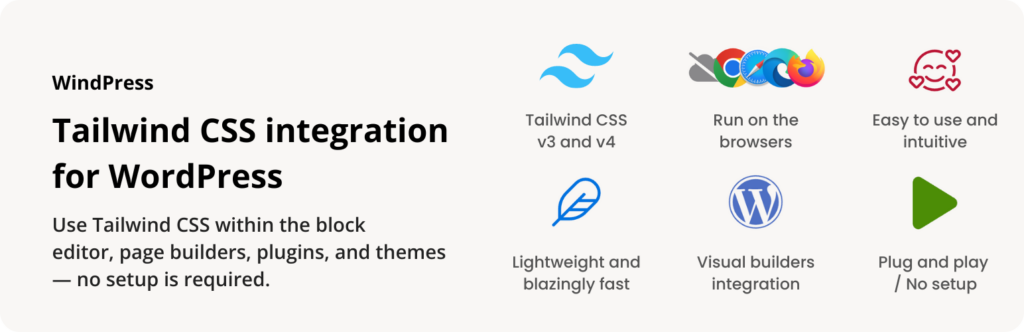
WindPress: the only Tailwind CSS v3 and v4 integration plugin for WordPress.
WindPress is a platform agnostic Tailwind CSS integration plugin for WordPress that allows you to use the full power of Tailwind CSS within the WordPress ecosystem.
Features
WindPress is packed full of features designed to streamline your workflow. Some of our favorites are:
- Plug and play: Start using Tailwind CSS in WordPress in seconds — no setup is required.
- Customizable Configuration: The plugin comes with a default Tailwind CSS configuration, but you can easily customize it to fit your needs.
- Easy to use: Simplified and intuitive settings to get you up and running quickly.
- Lightweight: The plugin dashboard built on top of WordPress REST API, and a modern JavaScript framework for an instant, responsive user experience. Yet it has a small footprint and won’t slow down your site.
- Blazingly fast: Cache makes your WordPress site blazing fast. Generate the final optimized CSS file in the browser without server-side tools. None of your data is transferred over the network.
And some specific integrations also include the following features:
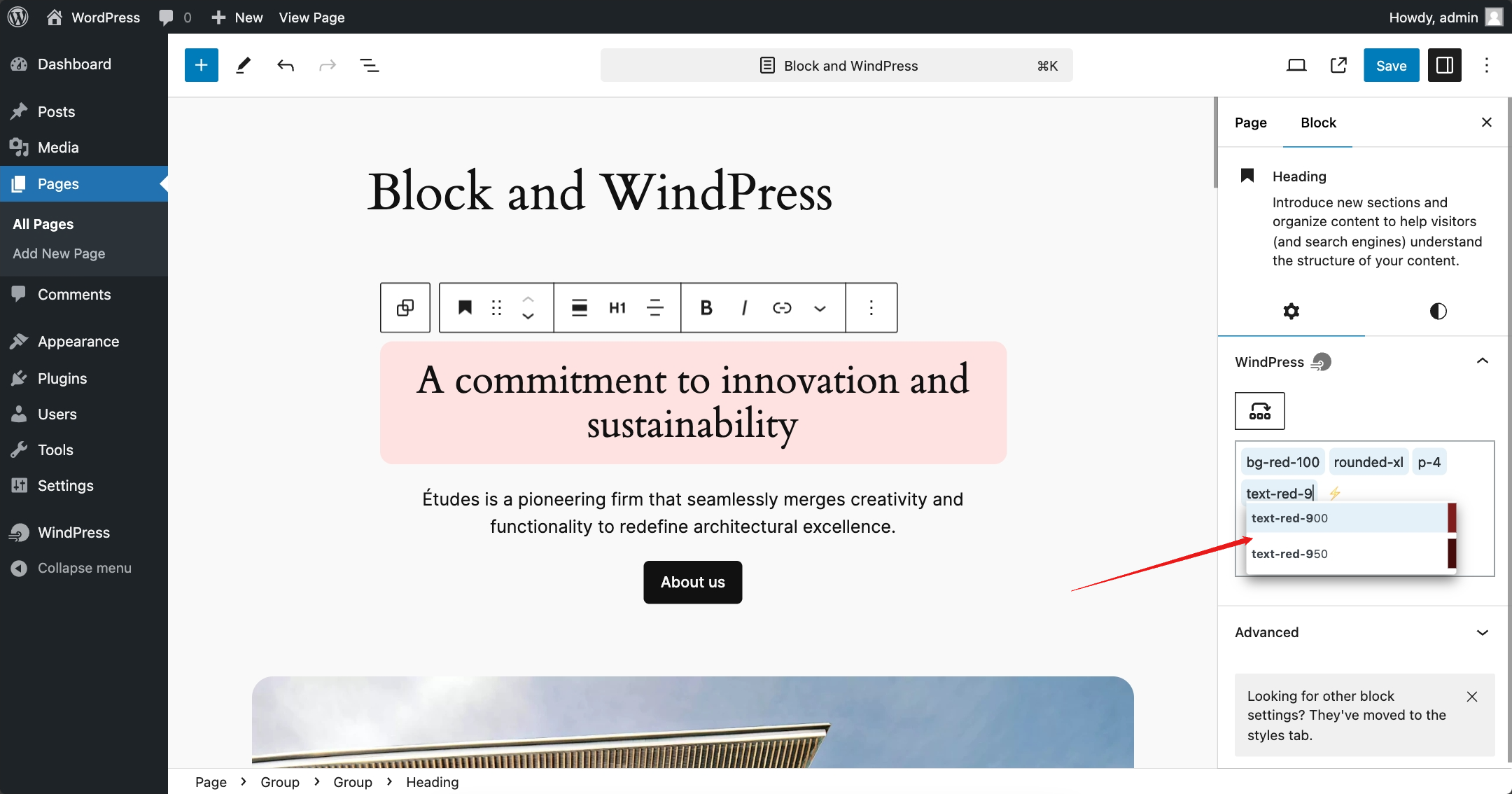
- Autocompletion: As you type, Tailwind CSS class names will be suggested automatically.
- Variable Picker: Easily select Tailwind CSS themes’ colors, fonts, and other variables from a panel.
- HTML to native elements: Convert Tailwind CSS HTML to native elements in the editor.
- Sort the classes: Sort the Tailwind CSS classes on the input field.
- Hover Preview the classes: Hover over the classes to see the complete outputted CSS and the preview of the design canvas.
- Ubiquitous Panel: A floating panel that allows you to quickly access the WindPress settings from anywhere on the page.
Seamless Integration
It’s easy to build design with Tailwind CSS thanks to the seamless integration with the most popular visual/page builders:
- Gutenberg / Block Editor
- GreenShift
- Kadence WP
- Timber
- Blockstudio — Pro
- Breakdance — Pro
- Bricks — Pro
- Builderius — Pro
- Etch — Pro
- LiveCanvas — Pro
- Meta Box Views — Pro
- Oxygen 6 / Classic — Pro
Planned / In Progress
Note: The core feature will remain available on all versions, but some integrations may be added or removed from the free version in the future.
More than a download.
The product sits inside a complete customer experience, with the essentials kept together before and after launch.
Open your accountPractical documentation
Find the path from installation to everyday use without digging through unrelated material.
Product updates
Eligible plans keep access to new releases through a familiar WordPress update workflow.
Human support
When the documentation is not enough, your account gives you a direct route to the support team.
One account hub
Downloads, order history, subscriptions, and licenses stay organized in one customer workspace.
See what changed.
New features, refinements, and fixes—documented release by release.
- Current version
- v3.3.92
- Last updated
v3.3.92
Latest-
Changed
Updated the WordPress compatibility declaration to 7.1.
v3.3.91
-
Fixed
[Breakdance] Improved builder compatibility and plain class synchronization.
v3.3.90
-
Fixed
[Bricks] Missing WindPress Tailwind class input in the Bricks 2.4 builder editor.
v3.3.89
-
Changed
Improved backend scanning and incremental cache builds, including detection of changed and deleted sources.
-
Fixed
Prevented fatal errors when upgrading from older versions with a different updater SDK #83.
v3.3.88
-
Fixed
[Wizard] Wizard settings now stay synchronized with direct edits to `wizard.css`.
-
Fixed
Fixed the Fluid Generator so complete spacing and text scales are created on the first attempt.
v3.3.87
-
Added
File tree drag-and-drop support.
-
Added
Folder actions for creating files and folders.
-
Fixed
Drag preview scrollbar flicker.
-
Fixed
File editor hotkeys not working correctly on MacOS.
-
Fixed
[Gutenberg] Canvas compatibility issue on the latest WordPress 7.1
-
Fixed
[Wizard] Reported volume save failures instead of displaying a false success message #81
Show 104 older versions
v3.3.86
-
Added
Updated bundled Tailwind CSS v4 to 4.3.3.
-
Fixed
[TW3] Browser compiler throws "Unable to determine current node version" #78
-
Fixed
[Gutenberg] Fixed saving issues when WPML is enabled.
v3.3.85
-
Added
Updated bundled Tailwind CSS v4 to 4.3.1
v3.3.84
-
Changed
Tested compatibility with WordPress 7.0.
-
Changed
[Gutenberg] Marked the Common Block content attribute for WordPress 7.0 pattern content editing.
v3.3.83
-
Added
Updated bundled Tailwind CSS v4 to 4.3.0
v3.3.82
-
Fixed
[Oxygen 6] Failed to load the integration's script files in the Oxygen 6 editor.
-
Fixed
[Internal] Improved WordPress Abilities API validation and error handling.
v3.3.81
-
Added
Oxygen 6 integration [Pro]
v3.3.80
-
Added
Updated bundled Tailwind CSS v4 to 4.2.4
-
Fixed
[Bricks] Fixed Variable Picker not opening in localized Bricks editor environments, including Japanese.
v3.3.79
-
Fixed
[Bricks] Prevented cache scans from crashing when `_cssGlobalClasses` is stored as a string #77
v3.3.78
-
Fixed
[Internal] Prevented no-input Abilities API callbacks from crashing when WordPress omits the input argument #76
v3.3.77
-
Added
Updated bundled Tailwind CSS v4 to 4.2.2
-
Changed
Migrate the build system to `@nabasa/vp-wp` for improved performance and better WordPress integration
v3.3.76
-
Changed
Readme version formatting for better display on WordPress.org
v3.3.75
-
Added
Updated bundled Tailwind CSS v4 to 4.2.1
v3.3.74
-
Added
Updated bundled Tailwind CSS v3 to 3.4.19
-
Added
Updated bundled Tailwind CSS v4 to 4.2.0
-
Fixed
[Breakdance] Prevented unwanted `margin-top` styles in the editor
-
Fixed
[Bricks] Improved Firefox compatibility for html2bricks copy-paste
-
Fixed
[Internal] Fixed compiler partial scanning cache behavior
-
Changed
Improved backend compile scan performance across integrations
-
Changed
Improved file editor support for Tailwind CSS v4 features
v3.3.73
-
Added
Updated bundled Tailwind CSS v4 to 4.1.18
-
Fixed
[Elementor, Bricks, Oxygen, OxygenClassic, Breakdance, Builderius, Timber, Blockstudio] Scanner now properly supports batch system to handle large datasets
-
Fixed
[Internal] JSON string detection in cache fetch_contents method to properly set content type
v3.3.72
-
Changed
Tested compatibility with WordPress 6.9
v3.3.71
-
Fixed
[Internal] Plugin's bundle (Zip) file are not generated correctly
v3.3.70
-
Fixed
[Internal] Plugin's bundle (Zip) file are not generated correctly
v3.3.69
-
Added
Initial WordPress Abilities API support (experimental)
-
Fixed
[Gutenberg] Generate Cache on Save feature's assets are not loaded correctly
-
Fixed
[Internal] path handling issue on the Windows OS
-
Changed
[Internal] Replace the old scanner's dependency with `@windpress/oxide-parser` package
v3.3.68
-
Added
[Gutenberg] Added Dark Mode toggle to switch between Light, Dark, and System themes
-
Added
[Gutenberg] Generate Cache on Save feature
-
Changed
Fixed color picker on the Wizard page when the initial color is empty
-
Changed
Redefined how styles are loaded on the front page based on the selected Performance Mode: Hybrid, Cached, or Compiler.
-
Removed
Reverted file version history feature introduced in v3.3.65 due to complexity and performance concerns
v3.3.67
-
Changed
[Gutenberg] Improved the Common Block's HTML to Blocks conversion process for better handling of complex HTML structures (experimental)
v3.3.66
-
Added
[Gutenberg] Introduced "Common Block" — a generic and flexible block that lets you build any HTML element, with import/export support (experimental)
v3.3.65
-
Added
Updated bundled Tailwind CSS v4 to 4.1.16
-
Added
Added file version history feature to the Simple File System (experimental)
v3.3.64
-
Added
Updated bundled Tailwind CSS v4 to 4.1.14
-
Added
[TW4] Source Map support for easier debugging in the browser DevTools (experimental)
-
Fixed
Wizard tree doesn't show the children nodes correctly #66
- Fixed
v3.3.63
-
Fixed
[Breakdance] Integration doesn't load on the recent version of Breakdance (v2.5.1)
-
Fixed
[TW4] IntelliSense was failing to correctly clean up `@apply` directives
v3.3.62
-
Changed
Improved file editor performance by registering IntelliSense only once after initialization
v3.3.61
-
Fixed
[Bricks] Plain Classes did not work on some Bricks template types like Archive, Search, and Section
v3.3.60
-
Added
Updated bundled Tailwind CSS v4 to 4.1.13
-
Added
[LiveCanvas] Added compatibility with LiveCanvas 4.7
-
Added
Added integrations settings page to manage the integrations features
v3.3.59
-
Fixed
[TW3] Missing `/css/preflight.css` file where the Preflight styles are enabled
v3.3.58
-
Added
Updated bundled Tailwind CSS v4 to 4.1.12
-
Changed
Restricted the IntelliSense on the Files tab feature to work exclusively with Tailwind CSS v4
-
Fixed
[TW3] Tailwind hover tooltips no longer show px equivalents #58
v3.3.56
-
Fixed
[TW4] IntelliSense performance issue on the Files tab for the CSS file
v3.3.55
-
Added
[TW4] IntelliSense on the Files tab for the CSS file
-
Added
WP-Rocket exclusion for the WindPress CSS and JavaScript files #54
-
Changed
[TW4] Autocompletion feature searches now is faster
-
Fixed
[Bricks] Plain Classes: Sort Classes glitch on the style
v3.3.54
-
Changed
[Gutenberg] Compiler: The raw block data is now appended on the scanner data to improve the class name detection #53
-
Changed
[Wizard] The Wizard's data is now can saved directly without the need to switch the Files tab first
-
Fixed
[Bricks] Plain Classes feature doesn't work correctly with Bricks' templates
-
Fixed
[Bricks] Variables value not registered correctly to the Bricks Global Variables system
v3.3.53
-
Added
[Bricks] Added compatibility with Bricks 2.0
-
Fixed
[Bricks] Plain Classes feature does not work correctly with the Components feature
v3.3.51
-
Fixed
The `wizard.css` file is not updated correctly on the syncing process
v3.3.44
-
Added
Updated bundled Tailwind CSS v4 to 4.1.11
-
Added
[TW4] The Wizard feature is now available on the Dashboard page
v3.3.43
-
Added
Updated bundled Tailwind CSS v4 to 4.1.10
v3.3.42
-
Changed
[Gutenberg] Ran the Play Observer / Compiler even when the visual editor is not iframed
v3.3.41
-
Fixed
[Bricks] Variables contain `--` in the value being registered to the Bricks Global Variables system
-
Fixed
Plugin's bundle (Zip) file are not generated correctly
v3.3.40
-
Changed
[Bricks] The Plain Classes and Variables feature compatibility for version 2.0-beta
-
Changed
Optimize the bundle (Zip) size of the plugin
v3.3.39
-
Added
Updated bundled Tailwind CSS v4 to 4.1.8
-
Changed
[TW4] The Play Observer / Compiler performance & stability
-
Changed
[TW4] Robust `@import` handling
v3.3.35
-
Changed
[Gutenberg] The Play Observer / Compiler stability
-
Fixed
[TW4] `@import` a CDN stylesheet is not working correctly
v3.3.34
-
Added
Etch integration [Pro] (experimental)
v3.3.33
-
Added
Updated bundled Tailwind CSS v4 to 4.1.7
-
Added
Added context menu to the Simple File System explorer (right-click on the file explorer)
v3.3.32
-
Added
Updated bundled Tailwind CSS v4 to 4.1.6
-
Fixed
Unable to add new files to the Simple File System
v3.3.31
-
Added
Updated bundled Tailwind CSS v4 to 4.1.5
-
Changed
[TW4] The compiler is now logging the candidates it has found to aid in debugging
v3.3.30
v3.3.29
-
Added
Updated bundled Tailwind CSS v4 to 4.1.4
v3.3.28
-
Changed
Safari browser compatibility
-
Changed
[Metabox Views] Scanner now use the rendered data instead of the raw data
v3.3.27
-
Fixed
[TW4] `@source` directive with `jsdelivr` CDN is not working correctly
v3.3.26
-
Added
Updated bundled Tailwind CSS v4 to 4.1.3
-
Changed
[TW4] Autocompletion feature now supports user-defined classes from the Simple File System data
-
Changed
Excluded WindPress files from processing by the SiteGround Speed Optimizer plugin
-
Fixed
[Gutenberg] Misconfigured integration on the block editor
v3.3.24
-
Fixed
[TW4] Error on generate cache caused by the `@source` directive change in the Tailwind CSS v4 (4.1.1)
v3.3.23
-
Added
Updated bundled Tailwind CSS v4 to 4.1.1
-
Changed
Added keyboard shortcuts to Generate Cache on the WindPress dashboard page
-
Changed
[TW3] The Play Observer / Compiler performance & stability
v3.3.22
-
Fixed
Storage issue on the Incremental Generate Cache feature #34
v3.3.21
-
Changed
[Experimental] The plugin is now fully translatable. Help us to translate the plugin into your language on WordPress.org
v3.3.12
-
Added
Updated bundled Tailwind CSS v4 to 4.0.17
v3.3.11
-
Added
Updated bundled Tailwind CSS v4 to 4.0.16
v3.3.7
-
Fixed
Browser compatibility issue with the latest compiler update.
-
Fixed
File on the editor are marked as read-only on Windows OS
v3.3.5
-
Added
Updated bundled Tailwind CSS v4 to 4.0.15
-
Added
[TW4] The compiler can now generate cache on front-end pages when the "Admin always uses Compiler" setting is enabled.
-
Fixed
[TW4][Breakdance, Bricks, Builderius, LiveCanvas, Oxygen Classic] The "Generate Cache on Save" feature are not available on the previous version
v3.3.4
-
Fixed
[TW4] The local stylesheet import is not resolved correctly
v3.3.3
-
Added
Oxygen 6 integration [Pro] (experimental)
-
Changed
[TW4] The Play Observer / Compiler performance & stability
-
Fixed
[TW4][Breakdance] Styles are now instantly applied in the editor
v3.3.2
-
Added
Updated bundled Tailwind CSS v4 to 4.0.14
-
Added
Refreshed the WindPress dashboard page design and layout for better user experience. Built with the latest Nuxt UI
-
Fixed
[TW3] The `tailwind.config.js` file is not properly loaded
v3.2.35
-
Added
Updated bundled Tailwind CSS v4 to 4.0.9
-
Changed
[TW4] Importing additional CSS files with the `@import` directive are now with the following format: `@import "fetch:https://example.com/path/to/the/file.css";`
v3.2.34
-
Fixed
Generating cache process issue on module resolution in the `main.css` file
v3.2.33
-
Fixed
Generating cache process issue on `@import` directive in the `main.css` file
v3.2.32
-
Added
Updated bundled Tailwind CSS v4 to 4.0.8
-
Added
WPCodeBox 2 integration [Pro]
-
Changed
Better performance on the generating cache process
-
Changed
[TW4] Generating the CSS cache will remove unused CSS variables. To always keep it, add them within the `@theme static { }` block in the `main.css` file. Alternatively, you can replace the `@import 'tailwindcss/theme.css' layer(theme);` code to `@import "tailwindcss/theme.css" layer(theme) theme(static);` on your `main.css` file.
v3.2.31
-
Fixed
Simple File System imported data are not loaded correctly
v3.2.30
-
Added
Updated bundled Tailwind CSS v4 to 4.0.7
-
Fixed
[TW4] The `@source` directive is causing error when loaded in the page builders' editor
v3.2.29
-
Added
Updated bundled Tailwind CSS v4 to 4.0.6
-
Added
[TW4] The `@source` directive is now supported but differs from the official Tailwind CSS version. Please refer to our documentation for details.
v3.2.28
-
Added
Updated bundled Tailwind CSS v4 to 4.0.5
v3.2.27
-
Added
Simple File System data are now exportable and importable from the WindPress dashboard page
v3.2.26
-
Added
Updated bundled Tailwind CSS v4 to 4.0.4
v3.2.25
-
Added
Updated bundled Tailwind CSS v4 to 4.0.3
v3.2.24
-
Added
Updated bundled Tailwind CSS v4 to 4.0.1
v3.2.23
-
Added
Updated bundled Tailwind CSS v4 to 4.0.0
v3.2.22
-
Fixed
[Gutenberg] The CSS class field autofocusing issue on the block editor
-
Fixed
[Gutenberg, Breakdance, Bricks, Builderius, LiveCanvas, Oxygen] The "Generate Cache on Save" feature doesn't use the selected Tailwind CSS version
v3.2.21
-
Added
Updated bundled Tailwind CSS v4 to 4.0.0-beta.6
-
Fixed
[Breakdance] Editor style is mixed with admin-bar style (margin-top)
v3.2.20
-
Changed
Decoupled the Gutenberg-based integrations scanner
-
Fixed
[Gutenberg, Breakdance, Bricks, Oxygen] The hover preview feature is too late to disappear when the mouse is moved away from the class name
v3.2.19
-
Added
Blockstudio integration [Pro]
-
Added
Updated bundled Tailwind CSS v3 to 3.4.16
-
Added
Updated bundled Tailwind CSS v4 to 4.0.0-beta.5
v3.2.18
-
Added
Updated bundled Tailwind CSS v4 to 4.0.0-beta.4
-
Added
Meta Box Views integration [Pro]
v3.2.17
-
Added
The new website and documentation is now live at windpress.jooo.si
-
Added
Updated bundled Tailwind CSS v4 to 4.0.0-beta.2
-
Fixed
Scanned classes names are not unescaped correctly (#4)
v3.2.16
-
Added
Updated bundled Tailwind CSS v4 to 4.0.0-beta.1
v3.2.15
-
Added
Updated bundled Tailwind CSS v3 to 3.4.15
-
Added
Updated bundled Tailwind CSS v4 to 4.0.0-alpha.34
-
Changed
Tested compatibility with WordPress 6.7
-
Changed
The LiveCanvas integration is now available on the Free version
-
Changed
Tailwind CSS v3 stubs/default content are updated for the upcoming Wizard feature
-
Fixed
[Gutenberg] Missing the WindPress data on the block editor
v3.2.13
-
Fixed
Settings page doesn't loaded
v3.2.12
-
Added
Updated bundled Tailwind CSS v4 to 4.0.0-alpha.33
-
Changed
[Breakdance, Bricks, Builderius, Oxygen] Variable Picker feature is now updated to the latest Tailwind CSS v4 variable names
-
Changed
Tailwind CSS v3 stubs are updated for the upcoming Wizard feature
-
Fixed
[Bricks] The Variable Picker panel is not showing correctly on the Bricks editor
v3.2.10
-
Added
Updated bundled Tailwind CSS v4 to 4.0.0-alpha.32
v3.2.9
-
Added
Updated bundled Tailwind CSS v4 to 4.0.0-alpha.30
v3.2.8
-
Added
Updated bundled Tailwind CSS v4 to 4.0.0-alpha.29
v3.2.7
-
Added
Updated bundled Tailwind CSS v4 to 4.0.0-alpha.28
v3.2.6
-
Added
Updated bundled Tailwind CSS v3 to 3.4.14
-
Added
Updated bundled Tailwind CSS v4 to 4.0.0-alpha.27
-
Added
[Bricks] added settings to enable or disable WindPress' features. Right-click the WindPress icon on the Editor's top bar to access the settings.
v3.2.5
-
Changed
Reduced the number of Play modules loaded on front-end pages for non-admin users
-
Changed
The Ubiquitous panel is now automatically hidden when outside of the panel is clicked
v3.2.4
-
Fixed
Breakdance integration doesn't work on the editor due to fail to load the required JavaScript files
v3.2.3
-
Added
Updated bundled Tailwind CSS v4 to 4.0.0-alpha.26
-
Changed
Improved handling of local JavaScript modules
-
Changed
Renamed some action and filter hooks
-
Changed
Some integrations' features are conditionally loaded based on the supported Tailwind CSS version
v3.2.1
-
Added
Ported Tailwind CSS v4 integration features to Tailwind CSS v3: Autocompletion, Sort, and Class Name to CSS
-
Changed
The Play Observer regenerates the CSS only if new classes are added to the DOM
v3.2.0
-
Added
Tailwind CSS v3 support has been added
-
Added
Updated bundled Tailwind CSS v3 to 3.4.13
-
Changed
Disabled preflight styles by default on new installations
-
Changed
The CSS and JavaScript files are now deletable by emptying the content
-
Changed
The `main.css` and `tailwind.config.js` files are now resettable by emptying the content
v3.1.17
-
Added
Updated bundled Tailwind CSS v4 to 4.0.0-alpha.25
v3.1.15
-
Changed
Added the bundled Tailwind CSS version number on the settings page
-
Changed
Relative path support for the local CSS and JavaScript files
v3.1.14
-
Added
Updated bundled Tailwind CSS v4 to 4.0.0-alpha.24
-
Added
A simple local CSS and JavaScript file support to manage the Tailwind CSS customizations
-
Fixed
The Ubiquitous Panel feature issue on the Bricks editor
v3.1.11
-
Changed
Temporarily disabled the Ubiquitous Panel feature on the Bricks editor due to integration issues.
v3.1.10
-
Added
Updated bundled Tailwind CSS v4 to 4.0.0-alpha.23
-
Added
Initial support on Tailwind CSS configs loaded from CDN with the `@config` directive
-
Changed
Internationalization (i18n) support on the admin dashboard
-
Fixed
Some style issues on the admin dashboard
v3.1.9
-
Added
Updated bundled Tailwind CSS v4 to 4.0.0-alpha.21
-
Added
Initial support on Tailwind CSS plugins loaded from CDN with the `@plugin` directive
-
Changed
Internationalization (i18n) support on the admin dashboard
v3.1.8
-
Added
Gutenberg integration.
-
Added
GreenShift integration.
-
Added
Kadence WP integration.
v3.1.6
-
Changed
Internationalization (i18n) support
v3.1.0
-
Added
Updated bundled Tailwind CSS v4 to 4.0.0-alpha.20
-
Added
Timber integration
-
Added
Bricks integration [Pro]
-
Added
Breakdance integration [Pro]
-
Added
Builderius integration [Pro]
-
Added
LiveCanvas integration [Pro]
-
Added
Oxygen integration [Pro]
-
Changed
Tested compatibility with WordPress 6.6
v1.1.0
-
Added
🐣 Initial release.
Keep building with less friction.
Explore practical WordPress products designed to help you build, launch, and maintain better sites.
Jooosi Social Image
Design branded Open Graph, X/Twitter, and featured images in WordPress. Connect reusable templates to live content, control where…

Jooosi Mail
Jooosi Mail routes WordPress email through SMTP and popular transactional email providers, with queued delivery, provider failover, detailed…
Jooosi Icon
Omni Icon: Modern icon management solution for WordPress. Upload custom icons, use bundled icons, or access 200,000+ icons…
From the people using it.
Experiences and feedback from people working with WindPress.
-
★★★★★
great job
Easy to use a ust have to optimize
-
★★★★★
intellectual
intellectual
-
★★★★★
Really great native way to use Tailwind on WP
Really great native way to use Tailwind on WP. Very happy it was released
-
★★★★★
Awesome tool for web designers
Thank you so much for creating this plugin. You guys are true lifesavers!
-
★★★★★
Easy and Fast
A plugin that meets expectations. Easy to use. Designer and developer friendly. Maybe you could add other cool features.
-
★★★★★
good but greenshift plugin is not compatible with it
easy to use, just need to fix the issue with the greenshift plugin
-
★★★★★
Perfect
Development is so much faster and the support is fantastic.
-
★★★★★
Greate tool!
As a developer, this tool has helped me a lot by eliminating the need to manually integrate Tailwind CSS into every theme or plugin I build. I just install the plugin and start using utility classes as usual — it’s super convenient. However, there are two main issues: IDE autocompletion doesn’t always recognize Tailwind classes provided by the plugin, which slows down workflow. CSS load timing — the WindPress-generated styles are injected late, causing a brief flash before styles apply (a few milliseconds delay). Overall, it’s a great tool that improves development speed, and I appreciate the effort behind it. Anyway, thanks to the developer for making this tool available on the WordPress marketplace — it really fills a useful gap.
-
★★★★★
Excellent !
An excellent tool for WordPress developers and designers! Windpress is extremely useful when you want to quickly prototype responsive layouts directly within the editor. Perfect for testing mobile and tablet versions without constantly switching to the front end. Lightweight, practical, and well-designed. Kudos to the developers!
-
★★★★★
Good!
Very good plugin, updated regularly, hope it continues like this!
-
★★★★★
Exceptional Tailwind CSS Integration for WordPress: Fully Deserving of 5 Stars
A plugin that integrates Tailwind CSS in WordPress with continuous updates, Tailwind v4 support, and incredible technical support truly deserves all 5 stars. It’s clear the team behind this tool is doing an exceptional job.
-
★★★★★
Great plugin to start with tailwind in wp
Actively developed and easy to use
-
★★★★★
Tailwind Developer tool no brainer!
Great UI update with Version 3.2.1! Well made plugin and does exactly what it needs to for tailwind integration. Frequent updates and great support a great addition to the WordPress ecosystem.
-
★★★★★
Weldone
Good job out there
-
★★★★★
Amazing Plugin!
It was everything I needed to create my own themes using Tailwind CSS.
-
★★★★★
The best Tailwind plugin for WordPress
If you’re looking for a way to integrate the Tailwind CSS framework into WordPress, WindPress is the perfect solution. It’s easy to set up and works seamlessly with the Block Editor.Trust me, no other WordPress plugin does it quite like WindPress. If possible, I recommend upgrading to WindPress Pro.
-
★★★★★
Easy to integrate
super easy to integrate with tailwind
-
★★★★★
Great
great work
-
★★★★★
Tailwind + Bricks Builder is the dream!
I use ReactJS and InertiaJS 2.0 to build plugins and Tailwind is the standard simply because you have to be a certified psycho nut case crazy person to use vanilla CSS. Bricks Builder and WindPress work very well together. This topic was modified 1 year, 6 months ago by forestcall.
-
★★★★★
Good plugin for tailwindcss with wordpress
Bro, you are a genius, for making tailwind available for wordpress
-
★★★★★
Melhor plugin para Tailwind no WP
Torna fácil a integração do Tailwind no WP e isso já o torna sensacional
-
★★★★★
Great works
Easy to useIntegrate with many page builders
-
★★★★★
A Tailwind Plugin That Shines with Bricks Builder
WindPress has been a fantastic tool in my design process with Bricks Builder. The plugin integrates smoothly, making it effortless to apply Tailwind CSS within Bricks, allowing for rapid customization without sacrificing design quality or responsiveness. Even though I primarily use Bricks, it’s worth mentioning that WindPress works equally well with many other site builders. Its flexibility across platforms makes it a solid choice for anyone looking to streamline their Tailwind workflow. If you’re using Bricks or any other builder and want a reliable way to implement Tailwind, WindPress is definitely worth it! This topic was modified 1 year, 11 months ago by Jornes. Reason: To correct the title
-
★★★★★
Greet plugins
good plugin for tailwind. thanks for joshua for this awesome plugins
-
★★★★★
Great plugin
If you’re looking to integrate Tailwind CSS with WordPress, Windpress is the solution you need.
-
★★★★★
the best out there!
It help you add tailwind to wordpress without hussle, easy and simple! I recommend to everyone!
-
★★★★★
Easy and quick setup of Tailwind CSS
Just installed it and seeing it is available for a lot of builders, constantly upgraded with new features. Looks very good!
-
★★★★★
Awesome Plugin For Tailwind in WordPress
Just install it & you will never regret it. Happy Making
-
★★★★★
Tailwind for wordpress!
WindPress has pleasantly surprised me. Being able to tweak Tailwind CSS and compile in the same browser has streamlined my workflow in ways I didn’t think possible. I don’t know how I ever worked without this before! This topic was modified 1 year, 12 months ago by xdanielmc. Reason: Wrong name
-
★★★★★
Lightweight plugin easy to use
The arrival of Windpress has simplified my work with Tailwind CSS in WordPress. Lightweight plugin, with extensive customization, easy to use and with features that I love such as compilation in the browser. La llegada de Windpress ha simplificado mi trabajo con Tailwind CSS en WordPress. Un plugin ligero, con gran personalización, fácil de usar y con características que me encantan como la compilación en el navegador.
-
★★★★★
WordPress themes with Tailwind
You can create custom WordPress sites using Tailwind’s utility classes. Even though it’s powerful, it got a learning curve for those who aren’t familiar with it. I hope the documentation arrives soon.
-
★★★★★
Best Tailwind WP plugin
I’m really happy to find this plugin because my development is so much easier with that. I highly recommend!
-
★★★★★
Best Tailwind plugin on the market!
So impressed with this plugin. I can vouch for the Bricks Builder version working perfectly when it comes to auto-complete and front-end rendering. But, that is not why I give this a 5/5. Josh, the author has been amazing with taking feedback and implementing changes. The support along with the plugin is amazing! I couldn’t ask for a better tool to implement Tailwind into WordPress. This topic was modified 2 years ago by portseif.
-
★★★★★
A W E S O M E
A great (and reliable!) way to use Tailwind inside various builders. I personally love the Bricks integration it’s paid but totally worth it.
-
★★★★★
Perfecto.
Va muy bien la versión Yabe Siul. Supongo que esta nueva versión irá aún mejor. This topic was modified 1 year, 8 months ago by luismumadrid.
-
★★★★★
Excelente integración de Tailwind con WordPress
Estoy muy contento de que Joshua haya creado WindPress. Tal como menciona, es la primera integración de Tailwind 4 con WordPress, y debo decir que funciona de maravilla. Estoy comenzando a usarlo y, hasta ahora, la experiencia ha sido excelente. Además, el soporte que brindan es de primera clase. Lo mejor de todo es que, con esta versión gratuita, espero que más personas se animen a adoptar Tailwind en sus proyectos de WordPress. ¡Totalmente recomendado!
-
★★★★★
Easy Tailwind integration for your favorite builder
Highly recommend to test this Plugin out, if you are working with Tailwind or looking for an easy integration with wordpress and your favorite builder.
-
★★★★★
Expecting
Hi. I bought it for its future integration into Pinegrow. Keep going! ;)
-
★★★★★
Lightweight plugin easy to use
The arrival of Yabe Siul has simplified my work with Tailwind CSS in WordPress. Lightweight plugin, with extensive customization, easy to use and with features that I love such as compilation in the browser.
-
★★★★★
Transformative Ease and Flexibility with Yabe Siul
After integrating Yabe Siul into my workflow, I've experienced a profound transformation in how I approach web development, especially when it comes to leveraging Tailwind CSS. The ease and flexibility offered by Yabe Siul are simply unparalleled, and it's a game-changer for developers at every level. What sets Yabe Siul apart is its seamless browser-based compilation feature. This innovation not only streamlines the development process but also significantly reduces the time and effort required to customize Tailwind CSS to meet the unique needs of a project. The convenience of having a real-time compilation process within the browser cannot be overstated; it allows for immediate feedback and iterative design adjustments, which is a huge boon for productivity. Moreover, the flexibility Yabe Siul provides is a major highlight. Whether you're working on a small project or a large-scale application, Yabe Siul adapts effortlessly, making Tailwind CSS customization intuitive and accessible. This flexibility ensures that developers can explore creative solutions without being bogged down by the complexities often associated with CSS frameworks. The support provided by Joshua and his team deserves special mention. Their commitment to ensuring users have a smooth experience with Yabe Siul is evident in the quality of assistance they offer. Quick, helpful responses to queries and a supportive community make navigating any challenges that arise much easier. In conclusion, Yabe Siul has redefined the way I work with Tailwind CSS, offering an unprecedented level of ease and flexibility. Its browser-based compilation feature is a standout, revolutionizing the development process by making it faster and more efficient. For anyone looking to streamline their Tailwind CSS customization, Yabe Siul is a highly recommended tool. Its impact on my productivity and the quality of my work has been immensely positive, and I believe it has the potential to benefit many others in the web development community.
-
★★★★★
Highly recommended
Yabe Siul is a game-changer! Tailwind CSS customization and browser-based compilation simplify my work!!
-
★★★★★
Totally recommended!!!
I am truly very happy that Joshua created SIUL, I am working with him and migrating my previous work from tailwind. It works very well and the support they provide is first class...
-
★★★★★
E4MS Yabe Siul
I have purchased Yabe Siul, and my first impressions have left me pleasantly surprised, it is an advanced complement, it works very fast and precise, I am very happy to have purchased it, I recommend it 100%


Please log in to write a review. Log in
Frequently Asked Questions
Product-specific answers, kept close to the details that matter before choosing a plan.
Ask a different questionWhich version of Tailwind CSS is supported by WindPress?
WindPress supports both Tailwind CSS versions 3 and 4 and will receive regular updates to support the latest version.
Is WindPress support the Tailwind CSS plugins?
Yes, WindPress supports Tailwind CSS plugins. You can add the plugins in the `tailwind.config.js` file editor. The Tailwind CSS plugins will be loaded from the esm.sh CDN.
Do I need an internet connection to use WindPress?
No, by default, you do not need an internet connection to use WindPress. However, an internet connection is required to load the Tailwind CSS plugins from the CDN.
What themes is WindPress compatible with?
WindPress is compatible with any WordPress theme. A small adjustment may be needed for the compiler scanner to detect the used classes in the theme. We have a guide on how to make the adjustment, check the documentation.
Do you offer a discount for students?
Yes, we offer a discount for students. Please send an email to WindPress support with subject "Student Discount" from your student email, and attach a photo of your student ID card or certificate.
Can I upgrade my plan later?
Yes, you can upgrade your plan at any time by paying the difference between the two plans. Please contact us if you need help with upgrading your plan.
Can I use WindPress for my website projects?
Yes, you can use WindPress for your website projects on any plan, including Free and Pro.
Can I cancel my subscription?
Yes, you can cancel your subscription at any time. Your subscription will remain active until the end of the billing cycle.
Do you offer refunds?
Yes, we offer a 14-day money-back guarantee. If you are not satisfied with WindPress, please contact us within 14 days of purchase for a full refund. We may ask for feedback to improve our product. Renewals are not eligible for refunds, you can cancel your subscription before the renewal date to avoid being charged.
Choose the plan that fits your workflow.
Start with what you need today. Every option is shown clearly, with no hidden product tier between you and the work.
Free
No charge
- Unlimited site activations
- 1 year of license validity
- WindPress product access
- Updates included with the plan
- Guides and product documentation
Pro
Billed every year
- Unlimited site activations
- 1 year of license validity
- WindPress product access
- Updates included with the plan
- Guides and product documentation
Pro — Lifetime
One-time payment
- Unlimited site activations
- Lifetime license validity
- WindPress product access
- Updates included with the plan
- Guides and product documentation