Jooosi Fon
The GDPR-friendly Font Plugin for WordPress that allow you to easily self-host Google Fonts and manage custom fonts with seamless integration into WordPress page builders.
- Support rating
- 5 out of 5 stars. 5-star support
- Active installs
- 7,239+ Happy Users
- Total downloads
- 37,480+ Download & Counting
Made to do one job exceptionally well.
Useful software should make the work feel simpler. The interface stays focused while the details remain close when you need them.
Yabe Webfont: the #1 Self-hosted Google Fonts and Custom Fonts Manager for WordPress
Yabe Webfont is a GDPR-friendly font WordPress plugin made for designers and developers that is advanced, easy to use, and intuitive to give you complete control over your fonts and typography in WordPress.
Features
Yabe Webfont is packed full of features designed to streamline your workflow. Some of our favorites are:
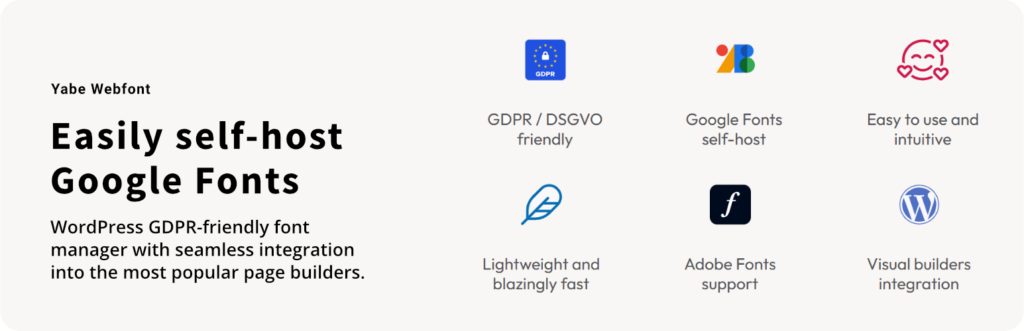
- GDPR / DSGVO friendly: You can import/self-host Google Fonts files from your server through your WordPress admin page. Fewer reasons to worry about GDPR / DSGVO compliance.
- Google Fonts and Adobe Fonts ready: Start using any available fonts on Google Fonts and Adobe Fonts.
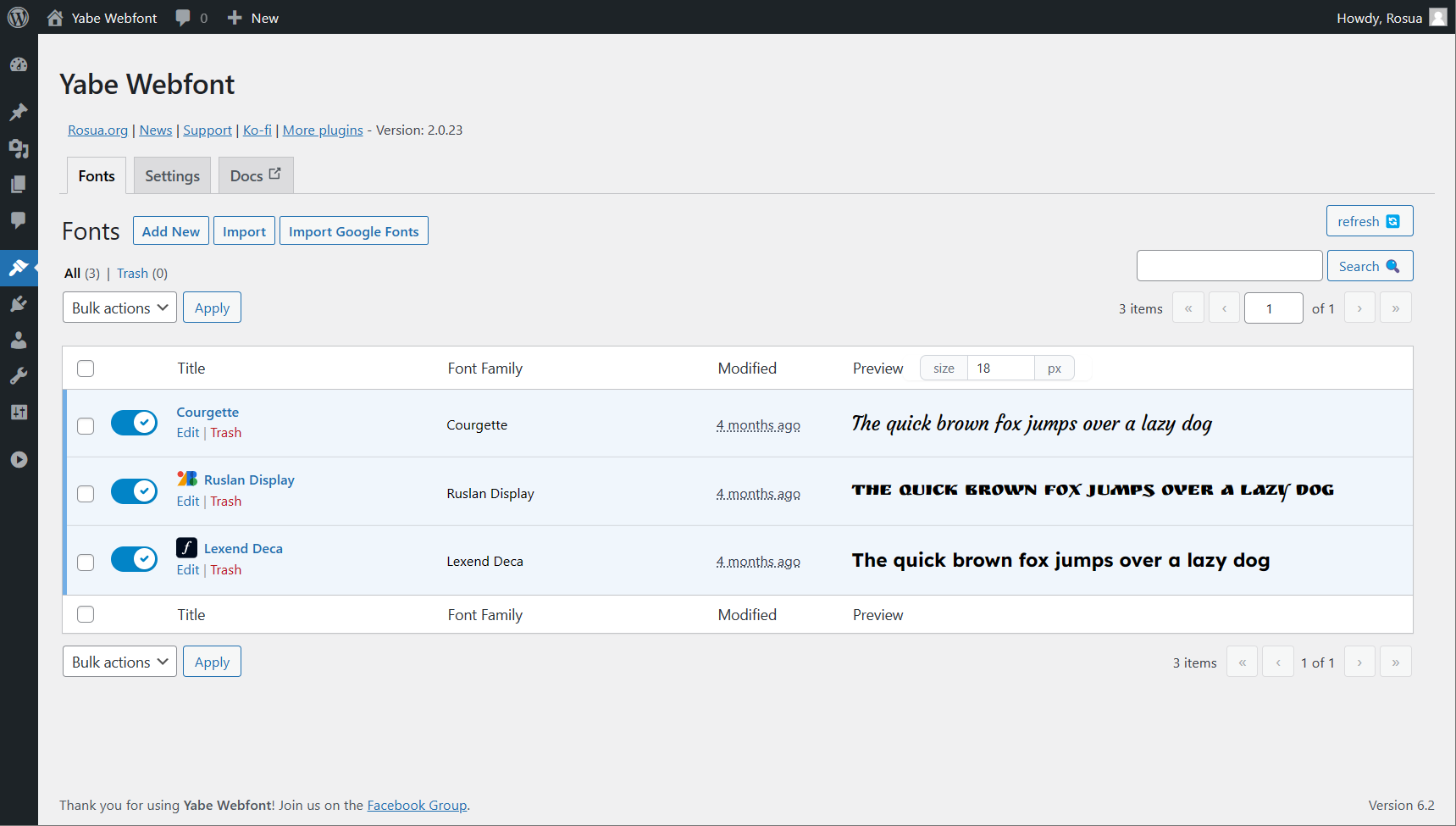
- Custom Fonts: A dedicated custom fonts manager for WordPress. The central place to manage all your fonts and typography.
- Easy to use: Add custom fonts to your WordPress site with a simple and intuitive interface. No coding knowledge is needed. You can upload the font files using the WordPress media uploader. No FTP is required.
- Fine-tuning: Complete control over your fonts and typography. On 90% of use cases, the default one is good to go.
- Lightweight and blazingly fast: The font management system uses WordPress REST API and a modern JavaScript framework for an instant, responsive user experience. The front page cache ensures fast loading and reduces database queries.
- Variable Fonts support: The format allows a single font file to contain multiple stylistic variations.
- Multisite support: The plugin is compatible with WordPress Multisite (Activate the plugin on the site level).
Seamless integration with page builders
The font must be available for use across different platforms. Yabe Webfont is famous for seamlessly integrating with the most popular visual/page builders:
- Builderius
- Classic Editor
- Elementor
- GeneratePress
- Gutenberg Blocks and Site Editor
- Kadence WP
- Pinegrow
- Beaver Builder — Pro
- Blocksy — Pro
- Breakdance — Pro
- Bricks — Pro
- Cwicly — Pro
- Divi — Pro
- Etch — Pro
- FunnelKit/SlingBlocks — Pro
- Greenshift — Pro
- Oxygen — Pro
- Slider Revolution — Pro
- Spectra — Pro
- YellowPencil — Pro
- Zion Builder — Pro
Note: The core feature will remain available on all versions, but some integrations may be added or removed from the free version in the future.
More than a download.
The product sits inside a complete customer experience, with the essentials kept together before and after launch.
Open your accountPractical documentation
Find the path from installation to everyday use without digging through unrelated material.
Product updates
Eligible plans keep access to new releases through a familiar WordPress update workflow.
Human support
When the documentation is not enough, your account gives you a direct route to the support team.
One account hub
Downloads, order history, subscriptions, and licenses stay organized in one customer workspace.
See what changed.
New features, refinements, and fixes—documented release by release.
- Current version
- v2.1.5
- Last updated
v2.1.5
Latest-
Fixed
WPML styles affecting the Jooosi Fon admin page when the WPML plugin is active.
v2.1.4
-
Fixed
Bricks 2.x integration when font favorites are not initialized.
v2.1.3
-
Fixed
Repair a missing font library table and add a manual Yabe Webfont migration action in Settings.
-
Changed
Test compatibility with WordPress 7.1.
v2.1.2
-
Fixed
Fix the Yabe Webfont to Jooosi Fon upgrade migration and make legacy data cleanup optional.
v2.1.1
-
Fixed
Prevent scoped release builds from generating broken proxies for WordPress functions declared by test stubs.
v2.1.0
-
Added
Added migration tool to import data from Custom Fonts by Brainstorm Force
-
Added
Added migration tool to import data from Custom Adobe Fonts
-
Added
Added migration tool to import data from Elementor Pro Custom Fonts
-
Added
Added migration tool to import data from Fonts Plugin
-
Added
Added migration tool to import data from Use Any Font
-
Changed
Rebrand the Yabe Webfont plugin as Jooosi Fon and move product links to fon.jooo.si.
-
Changed
Refresh the plugin's admin page
-
Changed
Custom Fonts bulk upload now automatically detects the font family and variant from the uploaded file name
-
Changed
Use `--jf--family-{font-slug}` for generated CSS custom properties while retaining `--ywf--family-{font-slug}` as a backward-compatible alias.
-
Changed
Replace the Rosua EDD license updater with Easy Digital Downloads' official Software Licensing SDK while preserving existing license activations.
-
Changed
Move legacy font uploads and generated cache files from `uploads/yabe-webfont` to `uploads/jooosi-fon` during the 2.x rebrand upgrade.
-
Changed
Mark the temporary 2.x rebrand migrations and compatibility shims for complete removal in Jooosi Fon 3.0.0.
Show 65 older versions
v2.0.114
-
Fixed
Prevent header warnings when LifterLMS sends headers after Jooosi Fon frontend output.
-
Changed
Use WordPress APIs to enqueue cached CSS, font preloads, and inline scripts.
v2.0.100
-
Changed
Improve WordPress.org changelog formatting and keep release notes in sync across releases.
v2.0.98
-
Added
Etch integration [Pro]. Type "ywf" on the Etch's CSS editor to see the font list.
-
Changed
Test compatibility with WordPress 6.9
v2.0.90
-
Added
Added opt-out settings to control Google Fonts disabling in page builders (Bricks, Elementor, Oxygen, Breakdance, Slider Revolution, FunnelKit) while maintaining GDPR compliance by default
-
Added
[Elementor] Added compatibility with Elementor v4 Atomic Widgets editor
v2.0.78
-
Changed
[Breakdance] Ensure compatibility with Breakdance 2.5.0 and later
-
Fixed
Multiple subsets for variable fonts are not loaded properly
v2.0.75
-
Changed
Ensure compatibility with Bricks 2.0-beta and later
-
Fixed
Duplicate import of Google Fonts variable font files
v2.0.74
-
Added
Google Fonts data are now loaded through the local machine.
v2.0.71
-
Changed
Remove the "[Jooosi Fon]" prefix/label from the font selection list [ticket#172]
-
Changed
[Known issue] Compatibility issue with some browsers that doesn't allow to input custom font weight when adding/editing a font on the Jooosi Fon dashboard page [ticket#179]
-
Changed
Update dependencies
v2.0.70
-
Changed
Test compatibility with WordPress 6.7
-
Changed
Update dependencies
v2.0.69
-
Changed
Google Fonts' variable font subset is now loaded properly
v2.0.67
-
Changed
Test compatibility with WordPress 6.6
-
Changed
[Beaver Builder] Fallback font is now always defined
v2.0.66
-
Changed
Plugin license activation process
v2.0.65
-
Changed
Test compatibility with WordPress 6.4
v2.0.64
-
Changed
Sort the font list by the font name in the visual builder's font picker.
-
Changed
Freshen up the plugin's admin page UI.
v2.0.63
-
Changed
Apply weight and width axes automatically for variable font (ttf/woff2) only if no existing file is found in the current variant.
v2.0.62
-
Changed
Ensure compatibility with all Adobe Fonts embed approach
v2.0.60
-
Changed
[Cwicly] Ensure compatibility with the latest Cwicly version.
v2.0.59
-
Changed
Test compatibility with WordPress 6.4
v2.0.58
-
Added
Slider Revolution integration [Pro]
-
Added
YellowPencil integration [Pro]
v2.0.57
-
Added
Added migration tool to import data from Dplugins Font Hero
-
Added
Added migration tool to import data from Bricks' Custom Fonts
v2.0.54
-
Changed
[Builderius] Ensure compatibility with the latest Builderius version.
v2.0.53
-
Changed
[Pinegrow] Pinegrow now available on the Free version.
v2.0.51
-
Changed
[Gutenberg] Ensure compatibility with the latest Gutenberg version.
v2.0.50
-
Added
Added option to disable Google Fonts API that loaded manually by the theme or plugin
-
Changed
Ensure compatibility with WordPress 6.3 and later.
-
Changed
[Builderius] Builderius now available on the Free version.
-
Changed
[Gutenberg] Ensure compatibility with Twenty Twenty-Two theme.
v2.0.49
-
Changed
The preload font files are now limited to `woff2` file format only.
v2.0.48
-
Changed
Ensure the uploaded font files are now stored in the `wp-content/uploads/yabe-webfont` folder.
v2.0.47
-
Added
Search Google Fonts by categories with syntax `:category name`. For example, `:handwriting` will return all fonts with the `handwriting` category and `:sans Open` will return all fonts with the `sans` category and the word `Open` in the font name.
-
Added
Search Google Fonts with extended syntax. Check out the documentation for more information.
-
Changed
Uploaded font files are now stored in the `wp-content/uploads/yabe-webfont` folder instead of the `wp-content/uploads/yyyy/mm` folder.
v2.0.46
-
Changed
[GeneratePress] Ensure compatibility with GeneratePress
v2.0.45
-
Fixed
Plugin not properly deployed
v2.0.41
-
Added
Blocksy integration [Pro]
v2.0.40
-
Changed
[Bricks] Ensure compatibility with Bricks
v2.0.39
-
Fixed
Plugin not properly deployed for PHP 7.4
v2.0.37
-
Changed
[Pinegrow] Ensure compatibility with Pinegrow 1.0.11
-
Changed
[Pinegrow] Remove version number from the font URL to avoid duplicate .css file link in the page source code.
-
Fixed
Plugin i18n doesn't use string literal for the text domain.
v2.0.34
-
Added
Pinegrow integration [Pro]
v2.0.32
-
Added
Jooosi Fon Lite is now available on WordPress.org.
v2.0.29
-
Changed
Move the Front page's CSS to higher priority to ensure the benefit from the preload feature is working properly.
v2.0.28
-
Changed
[Breakdance] Ensure compatibility with Breakdance 1.2.1
v2.0.27
-
Added
You no longer need to manually enter the license key, as it is now embedded in the plugin `.zip` file.
v2.0.25
-
Fixed
[GeneratePress] Google Fonts not disabled properly
v2.0.24
-
Added
The website has been redesigned, and the documentation is now available at fon.jooo.si
-
Added
FunnelKit/SlingBlocks integration [Pro]
-
Added
[GeneratePress] GenerateBlocks 1.8.0 and later integration
-
Changed
Performance optimization
-
Changed
[Beaver Builder] Disable built-in Google Fonts programmatically
-
Changed
[Breakdance] Ensure compatibility with Breakdance 1.3.0 and later
-
Changed
[Cwicly] Register the font using the new font system introduced in Cwicly 1.2.9.5
-
Fixed
[Zion Builder] Font list not showing on the visual editor
v2.0.23
-
Added
Export and import
-
Changed
[Builderius] Ensure compatibility with Builderius 0.11.0 and later
v2.0.22
-
Fixed
[Breakdance] CSS file loaded twice
v2.0.21
-
Added
Builderius integration [Pro]
v2.0.20
-
Added
Spectra integration
-
Added
Search Google Fonts by category with the `:` prefix. For example, `:sans-serif` will search for all fonts in the sans-serif category
-
Added
CSS custom properties (variables) with pattern `--ywf--family-{font-slug}` for each family
-
Added
Allow to define fallback font
-
Added
[Breakdance] Fallback font support
-
Added
[Bricks] Fallback font support
-
Added
[Gutenberg] Fallback font support
v2.0.19
-
Changed
The font files URL now is a relative path, ensure working between environments
-
Fixed
[Gutenberg] Site Editor compatibility
v2.0.18
-
Added
Adobe Fonts integration
-
Changed
Database query optimization
v2.0.17
-
Changed
[Bricks] Ensure compatibility with Bricks 1.7.1 and later
v2.0.16
-
Changed
Regenerate the font file URL with the new attachment URL
-
Changed
[Bricks] Font items on the Bricks editor are now grouped under the `Jooosi Fon` category
-
Fixed
Import Google Fonts form is not resetting properly after a successful import
v2.0.15
-
Added
Hide font files from Media Library
v2.0.14
-
Changed
IIS server compatibility
v2.0.13
-
Changed
Font' variants sort order
-
Changed
IIS server compatibility
v2.0.12
-
Added
Bulk file upload and auto-organize the font files to the matching variants
-
Changed
Bulk select variants on the Google Fonts import page
-
Fixed
The setting doesn't save properly on the plugin settings page
v2.0.11
-
Added
Kadence WP integration
v2.0.10
-
Changed
Fix compatibility with the Blisk browser
v2.0.9
-
Changed
[GeneratePress] Register fonts on the Theme Customize page
v2.0.8
-
Added
Divi integration [Pro]
v2.0.7
-
Fixed
[Oxygen] Gutenberg editor compatibility
v2.0.6
-
Added
Option of cache loading method, `file` or `inline`
-
Changed
Preload the font files
v2.0.5
-
Changed
Sync the cache generation
-
Changed
Add submenu to all page builders integration
-
Changed
[Bricks] Force disable the built-in Google Fonts and override the `Bricks > Settings > Performance: Disable Google Fonts` setting
-
Changed
[Elementor] Force disable the built-in Google Fonts and override the `Elementor > Settings > Advanced: Google Fonts` setting
-
Changed
[Gutenberg] Support non block-based theme
-
Changed
[Oxygen] Force disable the built-in Google Fonts and override the `Oxygen > Settings > Bloat Eliminator: Disable Google Fonts` setting
-
Fixed
Issue with the plugin upgrade for the upcoming version
-
Fixed
Revert the admin notices style to WordPress default
v2.0.4
-
Added
Greenshift integration [Pro]
-
Changed
Better variable fonts support for Google Fonts
-
Changed
Delete all fonts file associated with the deleted font
-
Changed
[Oxygen] Disable Elegant Custom Fonts plugin
-
Fixed
Scheduled cache generation not cleared properly on manual action
v2.0.3
-
Added
Breakdance integration [Pro]
-
Fixed
[Gutenberg] Font CSS not loaded on the FSE editor
v2.0.2
-
Changed
Tweak the plugin interface
-
Changed
Support width axes for variable fonts
-
Fixed
[Zion Builder] Font family list not showing up on the builder editor
v2.0.1
-
Changed
Lower the minimum PHP version to 7.4
v2.0.0
-
Added
Plugin rebuilt from scratch
-
Added
New plugin interface
-
Added
Custom fonts management
-
Added
Editable imported Google Fonts
-
Added
Beaver Builder integration [Pro]
-
Added
Bricks integration [Pro]
-
Added
Cwicly integration [Pro]
-
Added
Classic Editor integration
-
Added
Elementor integration
-
Added
GeneratePress integration
-
Added
Gutenberg integration
-
Added
Oxygen integration [Pro]
-
Added
Zion Builder integration [Pro]
-
Changed
Plugin admin menu moved to `Appearance -> Jooosi Fon`
-
Fixed
Some Google Fonts with variable fonts are not loaded properly
v1.0.0
-
Added
Initial release.
Keep building with less friction.
Explore practical WordPress products designed to help you build, launch, and maintain better sites.
Jooosi Social Image
Design branded Open Graph, X/Twitter, and featured images in WordPress. Connect reusable templates to live content, control where…
Jooosi Mail
Jooosi Mail routes WordPress email through SMTP and popular transactional email providers, with queued delivery, provider failover, detailed…
Jooosi Icon
Omni Icon: Modern icon management solution for WordPress. Upload custom icons, use bundled icons, or access 200,000+ icons…
From the people using it.
Experiences and feedback from people working with Jooosi Fon.
-
★★★★★
Very good and useful. Highly recommended.
Highly recommended.I tested the free version and – no doubt, the plugins work perfectly, easy to use.Thanks to the team for the excellent work.
-
★★★★★
really good plugin
really good plugin
-
★★★★★
Great plugin
Great plugin simple effective just fab A****
-
★★★★★
Me encanta Yabe Webfont
Gran aplicación para la gestión de fuentes en proyectos de WordPress, compatible con la mayoría de editores, solo me gustaría que contara con una opción para importar todas las fuentes de Google libres de manera automatizada y no de forma manual, por lo demás creo que han realizado un gran trabajo.
-
★★★★★
Awesome google font
Buys.com Awesome google font. Kompatibel with WordPress new release
-
★★★★★
I tried them all and than ..
I tried them all and than I found this, great!
-
★★★★★
Great!
You guys just did a great job! Your woff2 variable converter is exactly what I have been needing so hard over the recent years
-
★★★★★
Works perfectly.
Real timesaver. And affordable.
-
★★★★★
Great plugin, easy to use
This plugin did exactly what I needed without trouble and is updated regularly.
-
★★★★★
Recommended
Just does what needed with fonts. 1 year, and no regrets.
-
★★★★★
Excellent!!
Very efficient and easy plugin, that solves something that is usually complicated to do by code.
-
★★★★★
Works like a charm with Breakdance
I use it mainly with Breakdance Builder, and it makes the process of importing Google fonts much faster and easier. Great job
-
★★★★★
Works well so far
Works well with Elementor so far + nice UI and docs👍 Thanks for the plugin.
-
★★★★★
Best Font Manager Ever
Yabe Webfont is truly the best font manager that I have ever found. I can easily host my fonts locally with just a few clicks. No downloading or uploading is required. I’ve been recommending this plugin on my site since the day I used it. Keep up the good work!
-
★★★★★
Efficient and powerful tool
I was looking for a way to manage my fonts across builders and a way to optimize them as well. Yabe Webfonts let me do that easily.
-
★★★★★
Great plugin
So simple to use, efficient and precise for importing Google fonts to local, it also supports variable fonts and allows a granular setting of the char set. Great job!
-
★★★★★
Just what I needed
I was looking for a plugin like this for a long long time…. It is the greatest fonts plugin
-
★★★★★
Kudos to Yabe Webfonts
A wonderful plug-in that helps you properly manage type in your web projects. And Joshua is super responsive to feedbacks. I really like the way it manages variable fonts too. I’m currently using the free version but I’ll buy a licence because I think projects like this deserve support.Kudos. This topic was modified 2 years, 7 months ago by ilpiac.
-
★★★★★
super
Very useful to upload Google font
-
★★★★★
Great Plugin
Awesome This topic was modified 1 year, 5 months ago by Derin Tolu.
-
★★★★★
Transforming Typography in WordPress
Yabe Webfont has revolutionized the way I work with fonts in WordPress. The seamless self-hosting of Google Fonts ensures GDPR compliance without the usual headache. Its integration with visual builders is a major time-saver, allowing me to implement beautiful typography with ease. The plugin’s speed and intuitive design make it invaluable for anyone looking to enhance their website’s performance and aesthetic. Yabe Webfont isn’t just a tool; it’s a complete font management solution that has earned its place in my design toolkit. A stellar product that I can’t recommend enough!
-
★★★★★
Best fonts plugin ever!
This is the most powerful font plugin ever! Forget all the rest!It just works perfectly flawlessly.It prevents FOUC issues, it can import Google fonts, upload your font files, and load the font weights only when needed. It’s also perfectly compatible with Oxygen Builder.Look no more, this is the only font plugin that you will ever need!
-
★★★★★
Perfect Product
This plugin is exactly what I needed. Install, easily and quickly import the fonts I need directly from Google and then forget the plugin is even there. It's so easy to use, I use it for every client site so I'm not loading fonts from Google everytime. I also really appreciate how this plugin Integrates with popular WordPress website builders. I use Bricks Builder and it integrates with Bricks perfectly. If you need a fast and reliable way to stop using Google fonts and host them locally on your WordPress install, then get this plugin. It's money well spent.
-
★★★★★
Great Company and product
I've used quite a few other font plugins, WordPress and on different platforms and by far I enjoy this one the most. Thanks for your support and producing such a great product.
-
★★★★★
Love it with bricks!
great support!
-
★★★★★
Great plug-in!
Whilst it is quite early for me with the plug-in, I can tell you it is fantastic with minimal setup.
-
★★★★★
Great plugins, quality of life WordPress
I really like the Yabe plugins, the premium and free plugins are great and offer some amazing quality of life features to my WP builds.Keep up the good work.
-
★★★★★
Excellent job !!
Nice plugin, it does what is describes and the developer is very supportive !!
-
★★★★★
best gdpr-friendly font plugin
i used different plugins before, but they had troubles with Oxygen-builder. This one works like a charm.
-
★★★★★
Excellent time-saver
Yes it's easy to add fonts manually - but now I can do it in 2 minutes instead of 10. Pre-load with one-click - CSS provided if I want to circumvent the plugin. It's very neat. It also provides a nice, easy way to use Variable fonts. Several builders need 1 entry per weight/style... where Yabe allows you to upload just one font-file and properly apply the variations. Once I've done 10 projects it will have paid for itself in the time-saved alone.
-
★★★★★
Awesome Plugin
Great font management tool for wordpress. Very easy to use yet has many important feature to optimized font for webpage.
-
★★★★★
Great utility. Clean code and easy to use.
This is a fantastic plug-in and an instant-buy if your theme doesn’t already handle it for you. It’s powerful, flexible, easy to use, and lightweight. What more could you ask for?
-
★★★★★
Wonderful Plugin
The implementation is probably the best or easiest recognized feature of this plugin. To use VUE in the WP UI makes it feel fluid in experience. The actual plugin options are great. And the expected result for me works wonderful. I would like to request the option to rename or remove the "Yabe" prefix on those fonts, at least in Breakdance compatibility. Because to a client user, or in general, to look at a list of fonts prefixed Yabe in their dropdown label can be confusing. For me, in the code, I just removed this, because the only fonts I keep listed are the ones uploaded through this plugin.


Please log in to write a review. Log in
Frequently Asked Questions
Product-specific answers, kept close to the details that matter before choosing a plan.
Ask a different questionIs Jooosi Fon GDPR / DSGVO compliant?
Yes. Jooosi Fon lets you import and self-host Google Fonts files on your own server through the WordPress admin. Once self-hosted, the front end does not request the font files from Google, so visitor IP addresses and user agents are not shared with Google for font delivery.
Which font file formats are supported?
Jooosi Fon supports WOFF2, WOFF, and TTF files. WOFF2 is recommended for modern websites because it is highly compressed and supports variable-font workflows. A browser-based TTF-to-WOFF2 converter is also available.
Can I self-host Google Fonts with Jooosi Fon?
Yes. You can import Google Fonts from the WordPress admin, download the font files to your server, and serve them locally instead of loading them from Google servers.
Can I use Adobe Fonts with Jooosi Fon?
Yes. Connect an Adobe Fonts Web Project ID to sync the project and use its fonts inside WordPress.
Does Jooosi Fon support variable fonts?
Yes. Variable fonts can contain multiple stylistic variations in a single file. Enable variable-font support when importing a Google Font or adding a custom font.
Can I upload my own custom fonts?
Yes. You can upload custom font files through the WordPress media uploader, so FTP is not required.
Which page builders and themes are supported?
Jooosi Fon integrates with popular WordPress tools including Elementor, Bricks, Oxygen, Breakdance, Beaver Builder, Builderius, Cwicly, GeneratePress, GenerateBlocks, Gutenberg, the Classic Editor, Zion Builder, Kadence, Pinegrow, Blocksy, Divi, Greenshift, Spectra, and Slider Revolution. Availability can vary by edition.
Can Jooosi Fon disable builder-loaded Google Fonts?
Yes. On supported integrations, Jooosi Fon can programmatically disable a builder’s built-in Google Fonts loading so you can use a local-font workflow.
Do I need an internet connection to use Jooosi Fon?
Only when importing Google Fonts or synchronizing Adobe Fonts. After fonts are self-hosted, your website can serve them locally without external font requests.
Can I use Jooosi Fon for client and website projects?
Yes. Jooosi Fon can be used for website projects on both the Free and Pro plans. The Pro plan is intended for unlimited client sites and includes all integrations.
Can I upgrade my plan later?
Yes. You can upgrade at any time by paying the difference between plans. Contact support if you need help with an upgrade.
Can I cancel my subscription or request a refund?
You can cancel at any time, and the subscription remains active until the end of the current billing cycle. New purchases include a 14-day money-back guarantee; contact support within 14 days to request a refund. Renewals are not eligible for refunds, so cancel before the next renewal if needed.
Do you offer a student discount?
Yes. Email support with the subject Student Discount from your student email address and include a valid student ID or certificate to request eligibility.
Choose the plan that fits your workflow.
Start with what you need today. Every option is shown clearly, with no hidden product tier between you and the work.
Free
No charge
- Unlimited site activations
- 1 year of license validity
- Jooosi Fon product access
- Updates included with the plan
- Guides and product documentation
Pro
Billed every year
- Unlimited site activations
- 1 year of license validity
- Jooosi Fon product access
- Updates included with the plan
- Guides and product documentation
Pro — Lifetime
One-time payment
- Unlimited site activations
- Lifetime license validity
- Jooosi Fon product access
- Updates included with the plan
- Guides and product documentation